

Jump to content
View in the app

A better way to browse. Learn more.

xcamfan.com

A full-screen app on your home screen with push notifications, badges and more.

To install this app on iOS and iPadOS
  1. Tap the Share icon in Safari
  2. Scroll the menu and tap Add to Home Screen.
  3. Tap Add in the top-right corner.
To install this app on Android
  1. Tap the 3-dot menu (⋮) in the top-right corner of the browser.
  2. Tap Add to Home screen or Install app.
  3. Confirm by tapping Install.

Ev_guy...

Members
  • Joined

  • Last visited

Everything posted by Ev_guy...

  1. This could very well be Zoya's last evening, she is sitting quietly with Lev, reminiscing and with good music. As a final tribute, I suggest keeping her cam, 10_2 on in the number 1 spot all the next hours that she is awake, Whether or not she should be the top cam tonight, in spite of what other cams have to show us. Keep her cam in the number one spot as a farewell. Help me to do this if you believe Zoya was a good resident in the project and you want to show her respect for being with us.. Thanks.
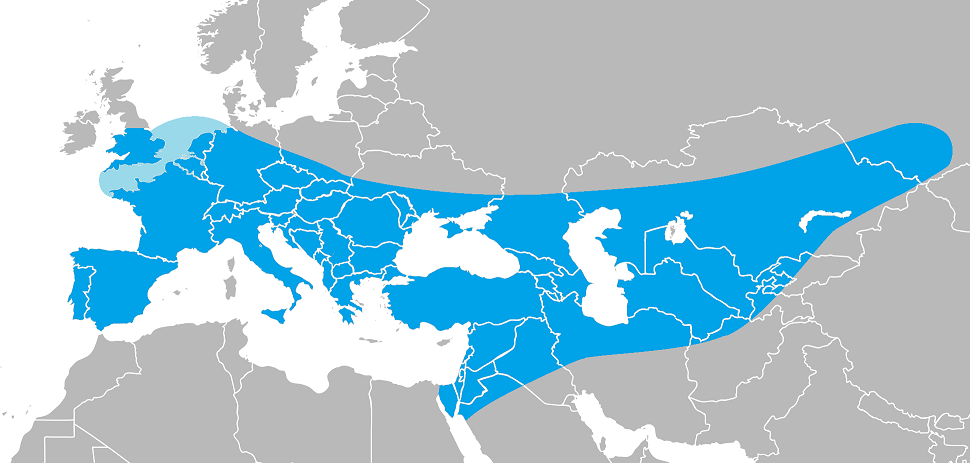
  2. well, they just might be decedents...right here in the middle of the neanderthal range map lies Bulgaria and Macedonia

Configure browser push notifications

Chrome (Android)
  1. Tap the lock icon next to the address bar.
  2. Tap Permissions → Notifications.
  3. Adjust your preference.
Chrome (Desktop)
  1. Click the padlock icon in the address bar.
  2. Select Site settings.
  3. Find Notifications and adjust your preference.