



.gif.c635a56b7fefe720de75a19d4745de74.gif)
StnCld316
Forum Admin
-
Joined
-
Last visited
Everything posted by StnCld316
-
.thumb.gif.9ff513ac73d201304fa9372c2114c99e.gif) Azura has rejoined the RLC project.
Azura has rejoined the RLC project. -
Brandon has departed the RLC project.
-
Apparently the websites host has moved, changed, or renamed the server, so admin can’t access it to update the certificate issue. He does have a ticket open though and is still hoping to have it fixed tonight.
-
Finally got a reply from admin. Apparently the websites host has moved, changed, or renamed the server, so admin can’t access it to update the certificate issue. He does have a ticket open though and is still hoping to have it fixed tonight.
-
Cam Caps should be back online soon. I just got a reply from admin.
-
It's offline. Hoping it will be back online at some point.
-
Or better yet just turn off Cloudflare. 🤣
-
Someone gave him the boot so now looking for another place to stay. 🤣
-
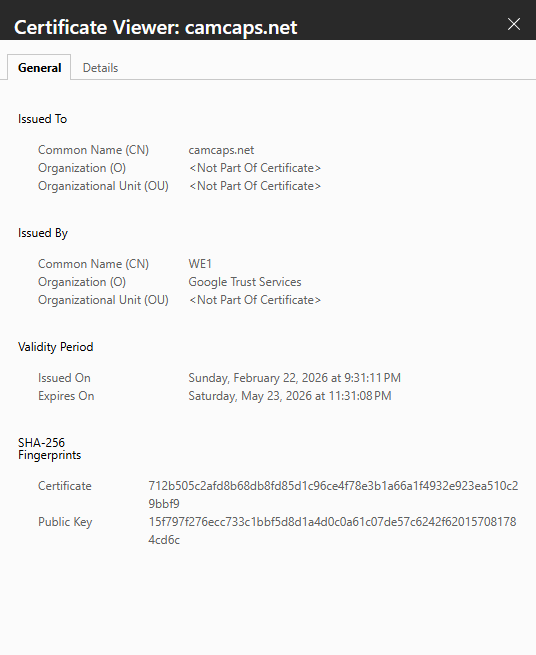
The SSL is not Invalid as it shows. The certificate is valid almost until the end of day May 23rd. I don't know what the actual reason for it being offline, I have sent emails to admin but I have yet to receive any response
-
They'll be relocating once again.
-
She should probably get surgery to remove the excess. Someone in a burn unit might really appreciate a new set of ears. 🤣
Her days are numbered. 🤣
Fan Page for Mariro & Jojo
Presently yes. Once Admin gets the issue resolved it will come back online.
Massaging the Brillo pad.
She has her own fan page.
At least for now, Henry's track record shows that girls don’t stick around for long with his Casanova attitude. 🤣
Topic for Indira Place your Comments and Pictures for this Apartment.



Account
Navigation
Search
Configure browser push notifications
Chrome (Android)
- Tap the lock icon next to the address bar.
- Tap Permissions → Notifications.
- Adjust your preference.
Chrome (Desktop)
- Click the padlock icon in the address bar.
- Select Site settings.
- Find Notifications and adjust your preference.
Safari (iOS 16.4+)
- Ensure the site is installed via Add to Home Screen.
- Open Settings App → Notifications.
- Find your app name and adjust your preference.
Safari (macOS)
- Go to Safari → Preferences.
- Click the Websites tab.
- Select Notifications in the sidebar.
- Find this website and adjust your preference.
Edge (Android)
- Tap the lock icon next to the address bar.
- Tap Permissions.
- Find Notifications and adjust your preference.
Edge (Desktop)
- Click the padlock icon in the address bar.
- Click Permissions for this site.
- Find Notifications and adjust your preference.
Firefox (Android)
- Go to Settings → Site permissions.
- Tap Notifications.
- Find this site in the list and adjust your preference.
Firefox (Desktop)
- Open Firefox Settings.
- Search for Notifications.
- Find this site in the list and adjust your preference.